Description
📝 Microsoft Word for Building IT Confidence
Join our Microsoft Word Workshop (2 Part Course) to build your digital confidence. Learn how to create professional, polished documents in a friendly, supportive environment. This 2 Part Course is designed to enhance your skills in a structured manner.
This hands-on course is perfect for anyone who wants to feel more confident using Microsoft Word; whether for work, study, or personal projects. You’ll learn how to create, format, and edit documents that really shine, with step-by-step guidance and plenty of practice time.
💷 This Course is Funded to Help You Build Confidence with IT!
This subsidised community course has been specially funded to make digital learning more accessible for everyone.
It’s designed to help you feel more confident using computers and Microsoft Word, whether you’re returning to learning, improving your employability skills, or just want to get more comfortable with technology in everyday life.
You’ll learn at your own pace in a supportive, welcoming space, with plenty of hands-on guidance every step of the way.
📅 When & Where
Starts: Tuesday 7th July 2026
Sessions: 2 x sessions — Part 1 July 7th 2pm – 4pm Part 2 July 14th 2pm – 4pm Please note that the booking is for both dates
Time: 2:00pm – 4:00 pm
Cost: £10 total for Both Dates
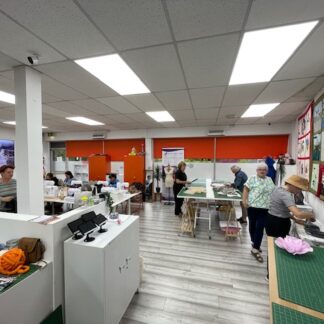
Location: Sew Mindful Crafts CIC, 5 York Buildings, Edlington Lane, Edlington, Doncaster, DN12 1BU
💡 Course Overview
Participants should be familiar with using computers, a mouse, and keyboard.
This two-week workshop will progressively cover the use of Microsoft Word — helping you create clear, attractive, and well-formatted documents with confidence.
WEEK 1 – Getting Started with Word
– Understanding and navigating the Word screen
– Using font formats and sizes
– Cut, Copy, and Paste
– Proofing tools (spelling and grammar checks)
– Save options and best practices
– Inserting pictures, shapes, and icons
WEEK 2 – Building on the Basics
– Page orientation and layout
– Headers and footers
– Adjusting margins
– Print preview and printing options
– Page breaks and document structure
– Using indents and alignment tools
💬 Why Join Us?
Gain confidence in creating and formatting professional documents
Build practical digital skills that support work, study, and wellbeing
Learn in a friendly, inclusive community environment
Share feedback to help shape future community wellbeing activities
♿ Accessibility & Support
Fully wheelchair-accessible venue
Free on-site parking
Air-conditioned building
Friendly, inclusive atmosphere
Free tea and coffee, plus use of kitchen facilities